



How To Read Nissan Altima Dashboard Icons
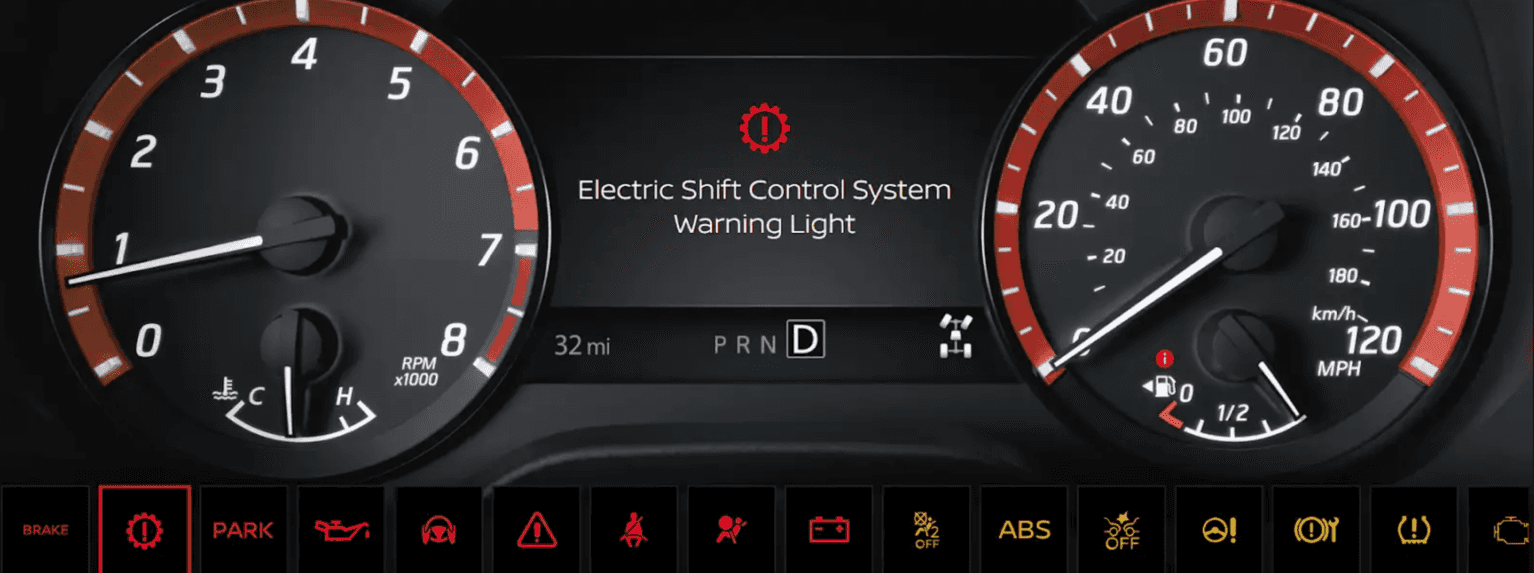
Photo Source/Copyright: NISSAN USA
Have you ever glanced down at your dashboard and wondered, “Why is my Nissan Altima suddenly communicating in a secret language of glowing symbols?” Your Altima’s instrument panel speaks in three tiers: Color tells you how urgent a situation is, the symbol tells you which system is involved, and the vehicle information display fills in the details. Reading the color first answers the question that actually matters when a light appears: is this something to deal with right now, or something to schedule for later this week?
What Your Altima’s Dashboard Light Colors Mean
Nissan groups Altima dashboard icons by color, and the grouping carries real meaning. Red points to a safety issue or a condition that could quickly damage the car. Yellow means a system needs attention soon, or that a driver-assistance feature has been switched off.
Green, blue, and white simply confirm that something is active and behaving normally. Triage by color first, then identify the symbol itself. The table below provides a single view of the full system.
| Color | What It Signals | What To Do |
|---|---|---|
| Red | A safety issue, or a condition that can cause damage quickly | Stop when it is safe to do so; do not keep driving |
| Yellow | A system needs attention soon, or has been switched off | Drive cautiously and schedule service |
| Green | A system is on and working as intended | No action needed |
| Blue or White | High beams are on (blue); a system is on standby (white) | No action needed |
Red Altima Warning Lights: Stop Driving
Red icons ask you to stop, not to press on. The engine oil pressure warning is the most consequential of the group: it signals low oil pressure rather than a low oil level, and Nissan states that engine damage caused by driving with it lit falls outside the New Vehicle Limited Warranty.
The brake warning may simply mean the parking brake is applied, but if it stays lit after release, check the fluid and don’t drive when the level sits below the MIN mark. The air bag light should glow for approximately seven seconds at startup, then go out. A blinking security indicator is normal.
- Brake warning: a circled exclamation point, or the word BRAKE
- Engine oil pressure: an oil can with a drip falling from the spout
- Charge warning: a battery with plus and minus terminals
- Supplemental air bag: a seated figure facing a large circle
- Master warning: an exclamation point inside a triangle
Yellow Altima Warning Lights: Schedule Service Soon
Yellow icons rarely demand an immediate stop, but they shouldn’t be ignored. A steady malfunction indicator often points to a minor issue, such as a loose fuel-filler cap or a nearly empty tank. A blinking one is different: it points to an engine misfire, and Nissan advises keeping speeds below 45 miles per hour (MPH) while avoiding hard acceleration and steep inclines.
Two yellow icons are frequently confused. The slip indicator blinks while stability control is actively working, which is entirely normal on wet or icy pavement. The ABS warning isn’t normal, and it means anti-lock assistance may be unavailable even though ordinary braking still functions as expected.
- Malfunction indicator: an outline of an engine block
- Low tire pressure: an exclamation point inside a horseshoe shape
- Anti-lock braking system: the letters ABS inside a circle
- Slip indicator: a car with wavy lines trailing beneath it
- Vehicle Dynamic Control OFF: the slip symbol with OFF printed below
- Electric power steering: a steering wheel beside an exclamation point
Green, Blue, and White Altima Indicators
These icons confirm rather than warn. Nothing needs fixing when one appears, though a few are worth recognizing, so you can switch a feature off when it’s not wanted.
If one behaves unexpectedly or stays lit far longer than usual, mention it at your next service visit. Color does most of the identification work here.
- High beam: a blue headlamp with straight horizontal lines
- High Beam Assist: a green headlamp marked with the letter A
- Side light and headlight: a green headlamp with angled lines
- Automatic brake hold: white while on standby, green while actively holding
Quick Checks Before You Schedule Service
A few dashboard lights clear on their own once you address the cause. Cold overnight temperatures, for example, routinely drop tire pressure enough to trigger a warning that disappears after inflation. Each check below takes a minute or two, and several resolve the most common complaints outright. Work through them before booking an appointment.
- Release the parking brake fully: before assuming the brake warning points to a fault
- Tighten the fuel-filler cap: if the check engine light is steady, then allow a few driving trips
- Inflate all four tires: to the cold pressure listed on the driver’s door-opening label
- Drive above 16 MPH after inflating: so the tire pressure monitoring system can reset
- Scroll to the Warnings screen: in the vehicle information display, when a master warning appears
Frequently Asked Questions
Q: Why is my Altima’s tire pressure light still on after I added air?
A: The light doesn’t clear by itself. Once all four tires sit at the cold pressure listed on the driver’s door-opening label, drive above 16 MPH for a short distance so the monitoring system can re-read each sensor.
Q: Can I drive my Altima with the ABS warning light on?
A: Ordinary braking still works, but anti-lock assistance may be unavailable, so stopping distances can lengthen on slick surfaces. Drive gently, leave extra following room, and have the braking system inspected promptly by a technician.
Q: Why is the master warning light red sometimes and yellow other times?
A: The two colors carry separate message sets. Red covers items such as a door open while moving, or a parking brake left engaged. Yellow covers reminders like low washer fluid or a loose fuel cap.
Schedule Nissan Altima Service
If a red icon appears, or a yellow one stays lit after the basic checks, our service team can pull the fault codes and confirm the cause. Note whether the light is steady or blinking. Book an appointment today.
More From Vision Nissan Webster
Mastering Your Nissan Ariya Range for Maximum Miles
Photo Source/Copyright: [INSERT] Two hundred and five miles at the low end. Three hundred and four at the top. That’s the full spread for the Nissan Ariya, and where any specific electric vehicle (EV) lands comes down to three main variables: the battery pack, the motor setup, and wheel size. Most range guides stop…
Explore Trails with the 2026 Nissan Pathfinder Rock Creek
Photo Source/Copyright: Nissan USA If you look closely at the 2026 Pathfinder lineup, the Rock Creek stands apart immediately. While standard trims rely on a 284-horsepower V-6, the Rock Creek tunes that same 3.5-liter engine to deliver 295 horsepower and 270 pound-feet of torque. Nissan doesn’t build a PRO-4X version of the Pathfinder, so…
Inside the Nissan Altima SV Trim Level
Photo Source/Copyright: NISSAN USA Shopping for an Altima used to mean sorting through confusing spec sheets and four overlapping trim tiers. Nissan pared things back, placing the SV trim right at the front of the lineup, a shift that fundamentally alters what “entry-level” means for this midsize sedan. In short, the Altima SV…